Quand on migre de dotclear à wordpress, il y a une fonctionnalité qui manque : c’est la possibilité de créer un lien vers un billet. En effet, le maillage interne d’un blog est très important pour inciter les lecteurs à parcourir le site. Dans l’interface de rédaction d’un billet, Dotclear a ajouté un bouton qui ouvre une fenêtre et liste les billets existants. Un clic sur l’un d’entre eux crée un lien vers celui-ci dans le billet en cours de rédaction.
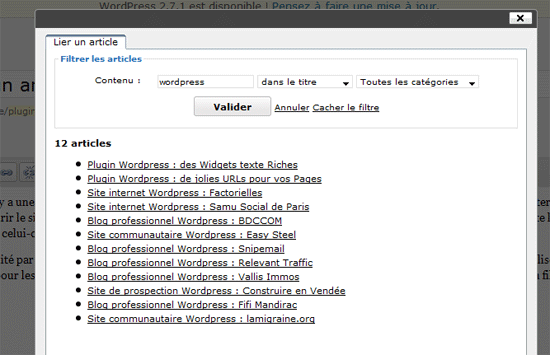
WordPress ne posséde pas cette fonctionnalité par défaut, mais le manque est désormais comblé grâce au plugin « link-to-post » que nous venons de réaliser. Ce dernier affiche deux boutons, un pour les billets et l’autre pour les pages. Il est possible de filtrer la liste des billets/pages grâce à un moteur de recherche, ainsi qu’un filtre sur les catégories (pour les billets uniquement).
Le plugin est actuellement sur le banc d’essai, n’hésitez pas à faire remonter tout éventuel dysfonctionnement.
Version 0.3 :
- traduction (français et anglais)
- interface d’administration pour permettre de choisir si l’on veut :
- rechercher automatiquement avec le texte sélectionné
- ajouter un élément nofollow sur les liens
- ajout du titre du billet en attribut « title » sur le lien généré
- correction du bug sur la pagination
Télécharger le plugin link-to-post 0.3
Par rapport à un plugin pour les « related posts » basé sur les tags, par exemple, c’est quoi l’intérêt ?
Je ne doute pas que ce soit un super plugin, tu ne m’as pas habitué à de l’inutile, mais là, ça m’échappe un peu… =)
Très bonne idée de plugin ! Je vais surement m’en servir mais il me manque 2-3 petites choses pour être heureux:
-que le texte sélectionné se retrouve d’office dans le champs de recherche
-que le titre de la page liée soit mis en attribut « title » sur le lien
-présence d’une case à cocher pour ajouter ou pas un « nofollow »
-avoir le bouton post to link aussi dans l’éditeur html (j’utilise très peu le wysiwyg)
Une autre idée serait d’insérer un shortcode de type [lien id=45]texte du lien[/lien] à la place du lien. Ce qui permettrais de ne plus se souciez du changement de permalink et de NDD (pour le principe, ce genre de plugin existe déjà, mais pas couplé a ton système)
Enfin voilà, ce sont surtout les 3 1ers points qui me paraissent les plus intéressant. C’est du bon boulot !
Delphine : Je ne sais pas si ça t’arrive, mais assez souvent, quand on rédige un article, dans le texte on veut faire un lien vers un autre article.
Exemple : Je vous ai déjà parlé dans un précédent article de la culture de la tomate…
Tu veux faire un lien dans le texte, vers l’article en question. Avec WordPress de base, tu es obligée d’aller chercher l’article en question, de récupérer son url, de sélectionner ton texte et de coller le lien.
Là il te suffit de sélectionner ton texte, cliquer le bouton du plugin, de mettre par exemple tomate dans le champ de recherche et alors il te propose une liste d’articles répondant à ta demande. Il te suffit alors de choisir l’article que tu veux lier et de valider, le lien est fait.
Julien : merci pour tes retours, ce sont effectivement de bonnes idées d’amélioration que l’on va intégrer rapidement.
Pour le nofollow, je m’étais posé la question, mais comme le but est de lier un de ses propres articles, je me suis dit que ce n’étais pas nécessaire.
Ah OK ! merci ! Effectivement, c’est puissantissime ! :D
Cool !
Pour le nofollow, oui c’est vrai que ce n’est pas bien grave. Je m’en sers juste à l’occasion pour linker des billets auquel je ne veux pas donner plus de poids qu’un autre (si je link 2 billets de sujet très similaire dans un même article, je met en nofollow un des 2). Mais c’est une utilisation rare ;)
Par contre si vous pensez intégrer le système de shortcode, pensez à laisser le système de lien « classique » actif en parallèle, car selon certains cas, l’utilisation de shortcode n’est pas toujours possible (imbrication de shortcode par exemple !)
Voilou :)
Excellent plugin (je viens de tester la version 0.2).
Perso, il me manque vraiment que
– le texte sélectionné se retrouve d’office dans le champs de recherche
mais je suis également sensible aux autres points de Julien.
J’ajouterais: la possibilité de choisir la target (meme si il est très, très rare que j’ouvre en _blank sur une de mes pages…)
Bon, et puis, le dream:
pouvoir lier les billets d’un autre blog hébergé sur le meme WordPressMU (pas sur que ce soit seulement possible).
Merci et bravoi, c’est vraiment le plugin qui me manquait sur WordPress.
C’est tellement bien que c’est déjà repris chez Geekeries : http://www.geekeries.fr/articles/link-to-post-lier-articles-pages-blog/#comment-9020
Très utile. Merci.
Encore mieux s’il y avait la possibilité d’inclure le permalink n’importe où (je pense aux custom fields par exemple)
Félicitations. Reste le problème de pérennité du lien en réécriture d’URL. Si le nom de l’article en url qui est l’objet du lien est changé, le lien n’est pas mis à jour ici. Un billet qui change de nom reste linké avec l’ancien nom. Cela crée de la duplication de contenu pour le référencement (lorsque l’id du produit reste inchangée et que la page est servie)
@Julien (pérennité du lien en réécriture d’URL): le probleme est pas lié à ce plugin: tout lien extérieur (souvent non-modifiable) vers ton billet à l’ancienne URL provoquera ce duplicate content.
Pour l’éviter, je te suggère l’excellent plugin Permalink Redirect:
http://scott.yang.id.au/code/permalink-redirect/
W.
works fine and looks good, thanks for sharing! would be nice to have an english translation! maybe I can help you with that, (just contact me if you want)?
Hi, this is a great plugin, works great except one thing: I currently have 20 posts, so the plugin shows two pages on the list of posts. The first page shows just fine showing first 15 posts. When I click on page number 2, however, it shows « no posts » instead of the remaining 5 posts. I tried this plugin on two wordpress 2.7.1 installations with nothing but this plugin enabled, both have the same behavior.
Thanks
@Birgit: thanks for your proposal, english translation is available on last version.
@Dion: thanks for having found this bug, corrected in the latest version.
http://wordpress.org/extend/plugins/link-to-post/
Hi Julien, thanks for the quick update. Now in english, great. However I still have the same problem. Page two still show « no post ». My browser is Chrome, I tried Internet Explorer 7 and same results.
Actually it worked at some point. There is still a little problem. So here’s how it happened.
1. At wordpress editor, I highlighted the part of the text I wanted to be made a link.
2. I clicked the « link to post » button. The link a post dialog appears.
3. At this point, when I click the next page, it says « no post », but the search form field also automagically filled with whatever part of text that I highlighted in point 1.
4. So I clicked « Cancel » to cancel the search. From this point, the page buttons work great, until I close the dialog and start over from point 1, then the whole thing happen again.
I noticed you put a setting page for this plugin. I made sure the « search with selected text » checkbox unselected. With the checkbox selected, it works as it should.
It’s getting there and when this issue is fixed it will be a perfect plugin!
Thanks again.
Indeed, there was still a bug. I hope everything is fixed now :
http://wordpress.org/extend/plugins/link-to-post/
Hi Julien,
The plugin works great now, thanks a bunch!!
Well there’s a very small thing, I think you forgot to put back the « $number » variable to 15 on line 175 (posts.php). The value was just 2, for testing purpose I guess.
Thanks again, great work.
oops, that’s true, I went too fast… Fixed in 0.3.2.
It seems not to work well with WP2.8. is this only my case or are you working on an update? Many thanks
Bonjour et merci pour ce plugin qui simplifie grandement l’insertion de liens internes. J’en profite pour lui faire un peu de pub ;-) http://www.guib.fr/link-to-post-plugin-pour-citer-un-article-de-votre-blog-wordpress.html
@Guiseppe : WP 2.8 plugin version will be online soon. ;)
@Guib : Merci pour le lien.
@Guiseppe : I just checked. The plugin works with wordpress 2.8. What does not work for you?
Great plugin, works on 2.7.1 like a charm.
One question, if I change the permalink of a post, does this plugin automatically update the link, or do I have to manually go back and update the post?
Thanks,
Paul
Bonjour,
Génial le concept du plugin ! Je trouve d’ailleurs très étonnant que ce soit le seul du genre. (enfin autant efficace donc). Par contre, avec la version 2.8 de WordPress, ça ne fonctionne effectivement pas… Est-ce que vous avez déjà une date prévue pour la mise en ligne de la nouvelle version ? Ou peut-etre pouvez-vous m’indiquer une subtilité à changer dans le code pour le rendre compatible ? (j’imagine que ça vient d’un changement d’une fonction de WordPress)
En tout cas il est cool !
Merci et bonne continuation ;-)
Julien, thank you for your replies. Perhaps the easiest thing is to attach screen shots of what happens to me!We as i could not upload an image here, i did it on my server. Please see them via these links.
http://www.gtcoaching.net/wp-content/images/link-to-a-page.png
http://www.gtcoaching.net/wp-content/images/link-to-a-post.png
Bonjour. Ca a l’air génial et exactement ce que je voudrais… Mais j’ai le même problème que Giuseppe. Version de PHP ? (Mon hébergeur est encore en 4…). Merci en tous cas !
Super, exactement ce que je cherchais !
Comprend vraiment pas pourquoi c’est pas de base dans WP.
Merci beaucoup pour le gain de temps!
I’ve just upgraded a site to WP 2.8 (from 2.7.1) and now have the exact same issue as Giuseppe does, whenever I attempt to link to a post, I get 20-odd black dots with no clickable links — same with links to Pages.
The only add-on’s i’m running are TinyMCE Advanced (which was also in 2.7.1) and the HTML Purifier module (http://urbangiraffe.com/plugins/html-purified/ — which was also in 2.7.1)
Uninstalling and Re-installing all three modules didn’t help the situation either.
Bonjour, Bonjour, tout d’abord, Bravo, super plugins. Par contre il ne marche pas sous WP 2.8, c’est bien dommage ! Est-ce qu’il sera possible d’etre avertis d’un update ?
Merci
Trés bon outils la chose que je le reproche c’est qu’il n’est pas utilisable si on utilise pas l’éditeur visuel que je n’utilise pas d’ailleurs.
Bonjour à tous,
Désolé pour le temps de réponse, je n’ai pas eu bcp de temps à consacrer au plugin ces dernières semaines.
Bon je suis assez étonné. Je l’ai installé sur plusieurs wordpress 2.8.1, et je n’ai aucun souci d’affichage (testé sous vista et xp avec toutes sortes de navigateurs).
L’un de vous peut-il me fournir le code HTML de la page qui pose problème ? Cela pourrait venir du contenu de l’attribut « title » qui affiche le résumé des articles.
voila le code HTML de la page :
http://blog.lyrixx.info/wp-content/uploads/2009/07/posts.php.txt
Julien
To see what happens to me please have a look at the screen-shots I have provided with my earlier message.
Thank you.
G
Ok parfait, je pense avoir résolu le problème. Curieusement, le plugin ne trouvait pas les titres de billet. J’ai donc remplacé :
$post->post_title
par :
get_the_title($post->ID)
Comme je n’ai pu reproduire l’erreur, dites moi si tout fonctionne pour vous avec la nouvelle version (0.4).
J’en ai profité pour ajouter les boutons en mode HTML.
Ok merci sa va être chouette maintenant si on peu l’utiliser en mode html. Très bon plugin.
Thanks Julien
How do I get the updated version?
Giuseppe, last version is online on wordpress.org.
I just fixed an error with the pagination, so : 0.4.1 (online in few minutes).
Thanks Julien
Now this is funny.
I upgraded. but now it tells me that there are no posts and neither pages…
Any clue why that might be?
je viens de faire la mise a jour, et j’ai toujours le meme problème. Si tu veux on peut communiquer par mail : greg[AT]lyrixx DOT info
Greg, peux-tu me lister les plugins activés sur ton wordpress ? Comme je n’ai eu le problème nulle part, je suspecte une incompatibilité.
Giuseppe, can you list the activated plugins on your wordpress ? As I did not have the problem anywhere, i suspect an incompatibility.
I have 51 plugins active…I know what you are thinking… :-I Apologies!
here is the list:
About Me
About Me is a sidebar widget that displays icon links to your profile pages on other social networking sites. Forked from Social Links
Version 1.0.5 | By Alessio Caiazza
Add From Server
Plugin to allow the Media Manager to add files from the webservers filesystem. Note: All files are copied to the uploads directory.
Add From Server |
Version 2.1 | By Dion Hulse
Admin Show Sticky
Adds a new column to the posts table in the admin to display if a post is sticky or not.
Version 1.0 | By Matt Martz
Ajax Category Dropdown
Generates multi-level ajax populated category dropdown widget. Perfect for blog with large numbers of categories as it only loads category sub level via AJAX requests.
Version 0.1.5 | By DyasonHat
AJAXify -Tastic
Used to add open close effects to the -Tastic WordPress plugin.
Version 1.5 | By Matt Martz
Akismet
« Akismet checks your comments against the Akismet web service to see if they look like spam or not. You need a WordPress.com API key to use it. You can review the spam it catches under « »Comments. » » To show off your Akismet stats just put in your template. See also: WP Stats plugin. »
Version 2.2.6 | By Matt Mullenweg
All in One SEO Pack
Out-of-the-box SEO for your WordPress blog. Options configuration panel
Version 1.6.4 | By Michael Torbert
Analytics360
Allows you to pull Google Analytics and MailChimp data directly into your dashboard, so you can access robust analytics tools without leaving WordPress. Compliments of MailChimp.
Version 1.0 | By Crowd Favorite
Note: Analytics360 requires account authentication to work. Go here to set everything up, then start analyticalizing!.
Broken Link Checker
Checks your posts for broken links and missing images and notifies you on the dashboard if any are found.
Version 0.5.4 | By Janis Elsts
Category Order
The Category Order plugin allows you to easily reorder your categories the way you want via drag and drop.
Version 1.0.3 | By Wessley Roche
Classic Image Button
Classic Image Button restores the classic image button in the Visual Editor of WordPress and optionally disables inline styling for images. A plugin from the PluginsPodcast.com.
Version 1.0.0 | By Angelo Mandato
Contact Form 7
Just another contact form plugin. Simple but flexible.
Version 1.10.1 | By Takayuki Miyoshi
Convert WP Database to UTF-8
Converts the WordPress database (both tables and columns) to UTF-8 character set.
Version 1.0.1 | By Yihui Xie
Custom Field Images
Easily associate any image to a post and display it in post excerpts, feeds etc.
Version 2.0.0.1 | By scribu
Dagon Design Sitemap Generator
Generates a fully customizable sitemap
Version 3.16 | By Dagon Design
Enhanced WP-ContactForm
WP Contact Form is a drop in form for users to contact you. In the message it sends to you it gives the page the user visited before the contact page, as well as the original outside referer. It can be implemented on a page or a post.
Version 2.2.3 | By Joost de Valk
-Tastic
Create and manage s. A short overview is given on the help page.
Version 1.0.15 | By John Godley
Featured Content Gallery
Used to create a customizable rotating image gallery anywhere within your WordPress site. FeaturedContentGallery.com: plugin page, instructions, gallery and .
Version 3.2.0 | By iePlexus
Fun Facts
Adds a sidebar widget that display interesting, useless, weird and wonderful random fun facts. After activating the plugin, go to Appearance ? Widgets to install the widget and to Settings ? Fun Facts to add your own fun facts.
Version 1.0 | By Joe’s Web Tools
Get Custom Field Values
Use widgets or template tags to easily retrieve and control the display of any custom field values/meta data for posts or pages.
Version 3.0.1 | By Scott Reilly
Google Analyticator
Adds the necessary JavaScript code to enable Google’s Analytics. After enabling this plugin visit the settings page and enter your Google Analytics’ UID and enable logging.
Version 5.1 | By Spiral Web Consulting | | |
Google Analytics for WordPress
This plugin makes it simple to add Google Analytics with extra search engines and automatic clickout and download tracking to your WordPress blog.
Version 2.9.5 | By Joost de Valk
Google XML Sitemaps
This plugin will generate a sitemaps.org compatible sitemap of your WordPress blog which is ed by Ask.com, Google, MSN Search and YAHOO. Configuration Page
Version 3.1.4 | By Arne Brachhold
Highlight Search Terms
« Highlights search terms when referer is a search engine or within wp search results using jQuery. No options to set, just add a CSS rule for class « »hilite » » to your stylesheet to make the highlights show up any way you want them to. Example: « » .post .hilite { background-color:yellow } « » Read Other Notes for instructions and more examples. »
Version 0.3 | By RavanH
Link to Post
Maintenance Mode
Adds a splash page to your blog that lets visitors know your blog is down for maintenance. Logged in administrators get full access to the blog including the front-end. Navigate to Settings ? Maintenance Mode to get started.
Version 4.3 | By Michael Wöhrer
Max Image Size Control
This plugin adds the functionality to change the max image size each category and post.
Version 0.1.2 | By Hiroaki Miyashita
My Category Order
My Category Order allows you to set the order in which categories will appear in the sidebar. Uses a drag and drop interface for ordering. Adds a widget with additional options for easy installation on widgetized themes. Visit the My Category Order page after updating WordPress to apply essential file patches.
Version 2.8 | By froman118
My Page Order
My Page Order allows you to set the order of pages through a drag and drop interface. The default method of setting the order page by page is extremely clumsy, especially with a large number of pages.
Version 2.8 | By froman118
Page Flip Image Gallery
FlippingBook Photo gallery plugin with page flip effects.
Version 0.5.6.2 | By FlippingBook WP team
Page Links To
Allows you to point WordPress pages or posts to a URL of your choosing. Good for setting up navigational links to non-WP sections of your site or to off-site resources.
Version 1.8 | By Mark Jaquith
pageMash
Manage your multitude of pages with pageMash’s slick drag-and-drop style, ajax interface. Allows quick sorting, hiding and organising of parenting.
Version 1.3.0 | By Joel Starnes
Page Menu Editor
Allows you to customise the title attribute and menu label of each page link in wp_list_pages.
Version 1.5 | By SarahG
Really Simple CAPTCHA
Really Simple CAPTCHA is a CAPTCHA module intended to be called from other plugins. It is originally created for my Contact Form 7 plugin.
Version 1.0 | By Takayuki Miyoshi
Robots Meta
This plugin allows you to add all the appropriate robots meta tags to your pages and feeds, disable unused archives and nofollow unnecessary links.
Version 3.0.11 | By Joost de Valk
SearchTerms Tagging 2
The purpose of this plugins is to strengthened our on page SEO by displaying additional internal linking to the blog post using the most popular keywords that visitors use to find the blog post from search engine.
Version 0.90713 | By Purwedi Kurniawan
SEO Slugs
Removes common words like ‘a’, ‘the’, ‘in’ from post slugs to improve SEO.
Version 1.0 | By Andrei Mikrukov
SI CAPTCHA
A CAPTCHA to protect comment posts and or registrations in WordPress. SI Captcha Options |
Version 1.6.7 | By Mike Challis
Simply Show IDs
Simply shows the ID of Posts, Pages, Media, Links, Categories, Tags and Users in the admin tables for easy access. Very lightweight.
Version 1.2 | By Matt Martz
Sociable
Automatically add links on your posts, pages and RSS feed to your favorite social bookmarking sites.
Version 3.4.1 | By Joost de Valk
Spider Tracker
Tracks search engine and other web robots/spiders activity on your WordPress blog. Stats | | .
Version 1.0.1 | By Tony Fernandes
Widget Logic
Control widgets with WP’s conditional tags is_home etc
Version 0.46 | By Alan Trewartha
WordPress.com Popular Posts
Shows the most popular posts, using data collected by WordPress.com stats plugin.
Version 2.0.2 | By Frasten
WordPress.com Stats
Tracks views, post/page views, referrers, and clicks. Requires a WordPress.com API key.
Version 1.5 | By Andy Skelton
WP-CopyProtect [Protect your posts]
This plug-in will protect your blog content [posts] from being copied. A simple plug-in developed to stop the Copy cats.
Version 1.9 | By Chetan Gole
WP-DBManager
Manages your WordPress database. Allows you to optimize database, repair database, backup database, restore database, delete backup database , drop/empty tables and run selected queries. s automatic scheduling of backing up and optimizing of database.
Version 2.50 | By Lester ‘GaMerZ’ Chan
WP-PostRatings
Adds an AJAX rating system for your WordPress blog’s post/page.
Version 1.50 | By Lester ‘GaMerZ’ Chan
WP Smush.it
Reduce image file sizes and improve performance using the Smush.it API within WordPress.
Version 1.2.1 | By Dialect
WP Subdomains
Setup your main categories, pages, and authors as subdomains and give them custom themes. Originally based on Subster Rejunevation.
Version 0.6.2 | By Alex Stansfield
WP Title 2
Add custom Heading, different from the Title, used in page links. Compatible with WP_Multilingual and qTranslate Plugins.
Version 2.1 | By Hristo Chakarov
Yet Another Related Posts Plugin
Hi Julien,
I’ve upgraded the primary site I use this on to WordPress 2.8.1 and 2.8.2 since my last report and I still have the same problem with this plugin displaying a list of black bullets for posts and pages.
I have also tried installing this on a new WordPress 2.8.2 install with no plugins and it seems to display correctly, could the problem have something to do with the upgrade process?
Paul
Brilliant! Thanks for this plugin, it saved me hours of work linking from one post to another.
5*’s :D
Hi…
Link to post is my favourite..and I have guide how to using this plugin fully with screen capture image to make it easier to understand.
look at http://pluginspecialist.com
thanks
joe
Excellente idée, excellent plug-in. Fonctionne parfaitement, merci !!
Excellent plugin! Il n’a qu’un défaut: le lien généré est absolu, du coup si on change de domaine, il faut refaire chaque lien.
Ce serait mieux si le code généré était qque chose comme:
[slug= »hello-world »] et a partir de ce snippet, le plugin les remplacerait par le code html correct. Mais dans le contenu du post, il n’y aurait que le snippet.
Bravo en tout cas!
Bonjour à tous,
Mauvaise nouvelle, Le plugin risque de ne plus être maintenu à l’avenir. La société Ajcréa est en pleine phase de restructuration et il est possible que nous abandonnions le développement de plugins à l’avenir.
Ah, ça, c’est une mauvaise nouvelle. C’était un très bon premier plugin!!
Donc, il faut qu’une bonne ame se dévoue pour reprendre sa maintenance?
Faut dire que ce n’est pas une mince affaire… vu son succès!
PS: bon courage pour la « restructuration »
(euh, toutes mes excuses, c’était le premier que je découvrais… mais je viens de voir qu’il y a avait eu d’autres avant…)
Pas de soucis Werner. En fait je vais essayer de maintenir les plugins, mais pour l’instant mon activité est un peu trop… intense.
Même si le plugin n’est plus maintenu, celui-ci fait des miracles pour moi !
Merci du travail et venez admirer le résultat sur http://www.insidedaweb.com ;)
Allez juste un petit commentaire histoire de te redonner du courage pour finit ce plugins ;)
Un grand merci d’avance !
Merci à tous pour vos encouragement et votre patience. Normalement Novembre devrait être un peu plus calme, j’ai bon espoir de pouvoir reprendre tout ça en main.
Hi there.
Great plugin, thank you very much. I think I have found an uncommon bug in your plugin though. I use WordPress largely as a CMS.
When one of my pages has this in it [[EventsCalendarLarge]], which is a way to embed the Events Calendar plugin, for some reason the ‘Link to Page’ breaks, and it seemingly tries to render the whole page with [[EventsCalendarLarge]] on it *inside* the ‘Link to Page’ popup/lightbox form, and therefore renders the onclick event useless (ie. it doesn’t correctly pass the link back to the page I’m trying to put a hyperlink in using your plugin. When I remove [[EventsCalendarLarge]] from the particular page that has it, the ‘Link to Page’ part of your plugin works fine.
If you happen to find a fix for this I would be greatful to know about it.
Cheers
Matt
thanks.
just wanted to say your plug-in does not check wp-content folder location. so if I move the folder somewhere else I got 404 error for your link2post.js in my logs!
Please, could you check why « Link to Post » does not work with « Sociable »?
The list of search posts comes blank to the screen, just with the bullets and the count of the results found. But no links to make the link.
I disabled Sociable and it works perfect. Also tested with Sexy Bookmarks and had almost the same problem.
Let’s make « Link to Post » very sociable! :-) Let me know if I can help with tests.
Great plugin! Thanks.
Hello!
I have made translation Your plugin into Belorussian. Please check email & answer me.
Regards, Fat Cower
Bonjour à tous et merci pour vos retours sur le plugin.
Comme j’en avais déjà parlé, je risquais de ne plus avoir le temps de maintenir le plugin, ce qui posait de nombreux problèmes.
J’ai donc proposé au développeur qui avait travaillé à l’élaboration de ces plugins de reprendre leur développement en son nom et il a accepté, donc attendez-vous à des mises à jour très prochainement, mais par une nouvelle personne.